dirsearch介绍

在网络安全和CTF比赛中,目录扫描往往是信息收集阶段的第一步,而dirsearch正是一款高效且轻量级的命令行工具,专为探测网站隐藏目录和文件而设计。它基于字典发起爆破请求,支持多种扫描模式、递归检测、代理配置以及结果过滤。

dirsearch安装

安装地址:maurosoria/dirsearch: Web path scanner

下载成功之后,直接使用pip install -r requirements.txt安装所需依赖库即可

dirsearch使用

master目录之下python运行即可

基本选项

-u URL:指定目标URL扫描(必填)

1
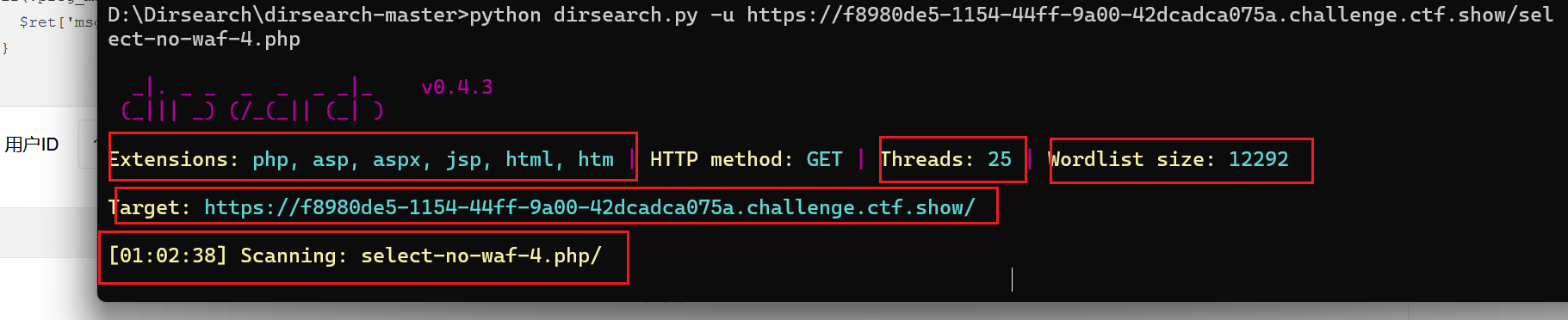
python dirsearch.py -u https://f8980de5-1154-44ff-9a00-42dcadca075a.challenge.ctf.show/select-no-waf-4.php

image-20260123010355915

  • Extensions:代表扫描哪些后缀的文件
  • Threads:扫描的线程大小,在真实的网站扫描中,线程的大小决定你的ip会不会被waf封禁
  • wordlist size:扫描字典的大小
  • Scanning:从哪个路由开始往下扫描

-l <FILE>:从文件中读取多个目录URL进行扫描

1
python dirsearch.py -l urls.txt

-e <EXT>:指定文件扩展名,覆盖默认值。

1
python dirsearch.py -u https://f8980de5-1154-44ff-9a00-42dcadca075a.challenge.ctf.show/ -e php,html,txt

image-20260123011137711

  • 这里可以使用*代表扫描配置文件中配置的所有后缀名

    1
    python dirsearch.py -u https://f8980de5-1154-44ff-9a00-42dcadca075a.challenge.ctf.show/ -e *

    image-20260123011325749

    可以看到比默认的扫描会多出`do、action、cgi、js、tar.gz`
    

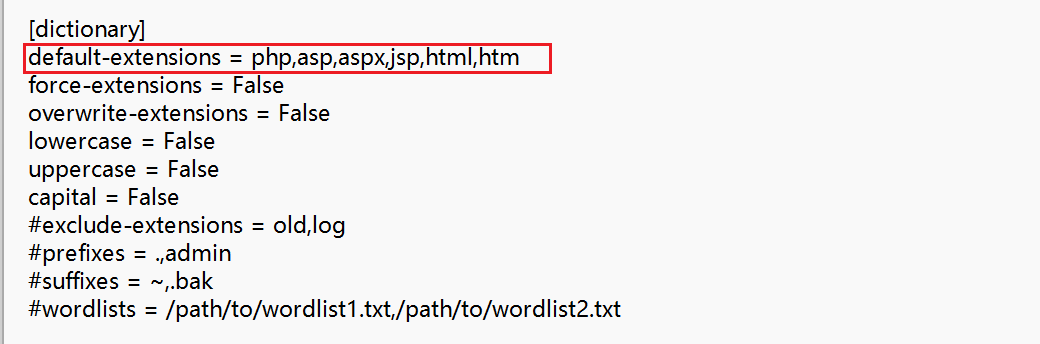
    可以在配置文件config.ini中配置默认扫描更多的后缀名

    image-20260123011624084

-x <EXT>:排除特定扩展名。

1
python dirsearch.py -u https://f8980de5-1154-44ff-9a00-42dcadca075a.challenge.ctf.show/ -x html,htm

字典选项

-w <FILE>:指定字典文件路径。

1
python dirsearch.py -u https://f8980de5-1154-44ff-9a00-42dcadca075a.challenge.ctf.show/ -w wordlist.txt

这里推荐字典SecLists:danielmiessler/SecLists: SecLists is the security tester’s companion. It’s a collection of multiple types of lists used during security assessments, collected in one place. List types include usernames, passwords, URLs, sensitive data patterns, fuzzing payloads, web shells, and many more.

需要什么类型的字典,直接使用deepwiki搜索该项目即可

-f:强行将扫描后缀加到每一个扫描词条的末尾

--prefixes <PREFIX>:为字典项添加前缀

1
python dirsearch.py --prefixes admin,_
  • 原始词条:tools,添加之后词条:admintools、_tools

--suffixes <SUFFIX>:为字典项添加后缀。

1
python dirsearch.py --suffixes admin,_
  • 原始词条:tools,添加之后词条:toolsadmin、tools_

请求选项

-m <METHOD>::指定 HTTP 方法(GET、POST、HEAD 等)。

1
python dirsearch.py -u https://example.com -m POST

-H <HEAD>:添加自定义请求头。

1
python dirsearch.py -u https://example.com -H "Authorization: Bearer token"

--user-agent <UA>:自定义 User-Agent。

1
python dirsearch.py -u https://example.com --user-agent "Mozilla/5.0 (Windows NT 10.0; Win64; x64)"

--cookie <COOKIE>:设置 Cookie。

1
python dirsearch.py -u https://example.com --cookie "SESSIONID=123"

连接选项

-t <NUM>:设置线程数。

1
python dirsearch.py -u https://example.com -t 5

--timeout <SEC>:设置请求超时时间。

1
python dirsearch.py -u https://example.com --timeout 10

--proxy <PROXY>:指定代理服务器。

1
python dirsearch.py -u https://example.com --proxy http://localhost:8080

--max-rate <RATE>:限制每秒请求数。

1
python dirsearch.py -u https://example.com --max-rate 100

过滤选项

--include-status <CODES>:仅显示指定状态码的结果。

1
python dirsearch.py -u https://example.com --include-status 200,301,302

--exclude-status <CODES>:排除指定状态码的结果。

1
python dirsearch.py -u https://example.com --exclude-status 404,500

--exclude-sizes <SIZES>:排除特定大小的响应。

1
python dirsearch.py -u https://example.com --exclude-sizes 0b,1kb

--exclude-text <TEXT>:排除包含特定文本的响应。

1
python dirsearch.py -u https://example.com --exclude-text "Not Found"

输出选项

-o <FILE>:指定输出文件。

1
python dirsearch.py -u https://example.com -o results.txt

--format <FORMAT>:指定输出格式(plain、json、xml 等)。

1
python dirsearch.py -u https://example.com --format json -o results.json

--quiet:启用安静模式,仅输出结果。

1
python dirsearch.py -u https://example.com --quiet

高级选项

默认扫描达到的深度:

1
2
3
4
5
https://target.com/  
├── admin/ # 不会扫描
├── api/ # 不会扫描
├── js/ # 不会扫描
└── index.php # 会扫描

-r, --recursive:启用递归扫描。

1
python dirsearch.py -u https://example.com -r

扫描范围:仅对以 / 结尾的目录进行递归。递归扫描的深度:

1
2
3
4
5
6
7
8
https://target.com/  
├── admin/ # 会扫描 (第1层)
│ ├── config.php # 会扫描
│ └── users/ # 会扫描 (第2层)
│ └── list.php # 会扫描
├── api/ # 会扫描 (第1层)
│ └── v1/ # 会扫描 (第2层)
└── index.php # 会扫描

--deep-recursive:启用深度递归。

1
python dirsearch.py -u https://example.com --deep-recursive

扫描范围:对 a/b/c 这样的路径会扫描 a/a/b/a/b/c/。深度递归扫描的深度:

1
2
3
4
5
6
7
8
9
10
https://target.com/  
├── admin/ # 会扫描 (第1层)
│ ├── config.php # 会扫描
│ └── users/ # 会扫描 (第2层)
│ └── list.php # 会扫描
├── api/ # 会扫描 (第1层)
│ └── v1/ # 会扫描 (第2层)
│ └── users/ # 会扫描 (第3层)
│ └── create.php # 会扫描
└── index.php # 会扫描

--crawl:启用爬虫模式,解析页面链接,对页面链接的数据目录再进行扫描,如果开启了深度扫描模式。

1
python dirsearch.py -u https://example.com --crawl

--random-agent:随机选择 User-Agent。

1
python dirsearch.py -u https://example.com --random-agent

常用命令

ctf一键扫描

1
python dirsearch.py -u https://example.com -e* --crawl --deep-recursive --exclude-status 404,500

真实网站扫描

1
python3 dirsearch.py -u https://target.com -t 2 --delay 1.0

基本目录扫描

扫描目标网站的常见目录和文件,使用内置所有拓展名:

1
python dirsearch.py -u https://example.com -e*
  • 扫描扩展名为 .php, .jsp, .asp, .aspx, .do, .action, .cgi, .html, .htm, .js, .tar.gz 的文件。
  • 使用默认字典(db/dict.txt)和 25 个线程。

自定义字典与代理

扫描特定子目录,使用自定义字典并通过代理:

1
dirsearch.py -u https://example.com/admin从/admin/ -w /path/to/custom_dict.txt -e php --proxy http://localhost:8080
  • 扫描 /admin/ 子目录。
  • 使用自定义字典和代理服务器。

递归扫描与结果过滤

启用递归扫描,仅显示特定状态码并输出 JSON 报告:

1
dirsearch.py -u http://example.com -r -i 200,300-399 -o results.json --format json
  • 显示 200 和 300-399 状态码。
  • 输出 JSON 格式报告。

高并发与速率限制

高线程扫描,同时限制请求速率以避免触发防御:

1
dirsearch.py -u https://example.com -t 100 --max-rate 50 --timeout 10
  • 使用 100 个线程,每秒最多 50 个请求。
  • 设置 10 秒超时。

结合 Burp Suite 进行深入测试

通过 Burp Suite 代理进行扫描并启用爬虫模式:

1
dirsearch.py -u https://example.com --proxy http://127.0.0.1:8080 -e php,asp --crawl
  • 启用爬虫模式,解析页面链接。
  • 流量通过 Burp Suite 代理,便于手动分析。

深度优化与自定义配置

递归扫描,限制深度并排除特定子目录,添加自定义请求头:

1
dirsearch.py -u http://example.com -r -R 3 --exclude-subdirs logs,static -e* -H "X-API-Key: abc123" -f
  • 递归扫描,最大深度 3。
  • 排除 logsstatic 子目录。
  • 添加自定义请求头 X-API-Key: abc123

帮助手册翻译

1
2
3
4
5
6
7
8
9
10
11
12
13
14
15
16
17
18
19
20
21
22
23
24
25
26
27
28
29
30
31
32
33
34
35
36
37
38
39
40
41
42
43
44
45
46
47
48
49
50
51
52
53
54
55
56
57
58
59
60
61
62
63
64
65
66
67
68
69
70
71
72
73
74
75
76
77
78
79
80
81
82
83
84
85
86
87
88
89
90
91
92
93
94
95
96
97
98
99
100
101
102
103
104
105
106
107
108
109
110
111
112
113
114
115
116
117
118
119
120
121
122
123
124
125
126
127
128
129
130
131
132
133
134
135
136
137
138
139
140
141
142
143
144
145
146
147
148
149
150
151
152
153
154
155
156
157
158
159
160
161
162
163
164
165
166
167
168
169
170
171
172
173
174
175
176
177
178
179
180
181
182
183
184
185
186
187
188
189
190
191
192
193
194
195
196
197
198
199
200
201
202
203
204
205
206
207
208
209
210
211
212
213
214
215
216
217
218
219
220
221
222
223
224
225
226
227
228
229
230
231
232
233
234
235
236
237
238
239
240
241
242
243
244
245
246
247
248
249
250
251
252
253
254
255
256
257
258
259
260
261
262
263
264
265
266
267
268
269
270
271
272
273
274
275
276
277
278
279
280
281
282
283
284
285
286
287
288
289
290
291
292
293
294
295
296
297
298
299
300
301
302
303
304
305
306
307
308
309
310
311
312
313
314
315
316
317
318
319
320
321
322
323
324
**Usage:** dirsearch.py [-u|--url] target [-e|--extensions] extensions [options]
**用法:** dirsearch.py [-u|--url] 目标 [-e|--extensions] 扩展名 [选项]

**Options:**
**选项:**
--version show program's version number and exit
--version 显示程序版本号并退出
-h, --help show this help message and exit
-h, --help 显示此帮助信息并退出

**Mandatory:**
**必选项:**
-u URL, --url=URL Target URL(s), can use multiple flags
-u URL, --url=URL 目标 URL(可以是多个,使用多个标志)
-l PATH, --urls-file=PATH
-l 路径, --urls-file=路径
URL list file
URL 列表文件
--stdin Read URL(s) from STDIN
--stdin 从标准输入读取 URL
--cidr=CIDR Target CIDR
--cidr=CIDR 目标 CIDR
--raw=PATH Load raw HTTP request from file (use '--scheme' flag
--raw=路径 从文件加载原始 HTTP 请求(使用 '--scheme' 标志
to set the scheme)
设置协议方案)
--nmap-report=PATH Load targets from nmap report (Ensure the inclusion of
--nmap-report=路径 从 nmap 报告加载目标(确保
the -sV flag during nmap scan for comprehensive
在 nmap 扫描时包含 -sV 标志以获取
results)
全面结果)
-s SESSION_FILE, --session=SESSION_FILE
-s 会话文件, --session=会话文件
Session file
会话文件
--config=PATH Path to configuration file (Default:
--config=路径 配置文件路径(默认:
'DIRSEARCH_CONFIG' environment variable, otherwise
'DIRSEARCH_CONFIG' 环境变量,否则为
'config.ini')
'config.ini')

**Dictionary Settings:**
**字典设置:**
-w WORDLISTS, --wordlists=WORDLISTS
-w 单词列表, --wordlists=单词列表
Wordlist files or directories contain wordlists
单词列表文件或包含单词列表的目录
(separated by commas)
(用逗号分隔)
-e EXTENSIONS, --extensions=EXTENSIONS
-e 扩展名, --extensions=扩展名
Extension list, separated by commas (e.g. php,asp)
扩展名列表,用逗号分隔(例如 php,asp)
-f, --force-extensions
Add extensions to the end of every wordlist entry. By
将扩展名添加到每个单词列表条目的末尾。默认
default dirsearch only replaces the %EXT% keyword with
情况下,dirsearch 仅将 %EXT% 关键字替换为
extensions
扩展名
--overwrite-extensions
Overwrite other extensions in the wordlist with your
用您选择的扩展名覆盖单词列表中的
extensions (selected via `-e`)
其他扩展名(通过 `-e` 选择)
--exclude-extensions=EXTENSIONS
--exclude-extensions=扩展名
Exclude extension list, separated by commas (e.g.
要排除的扩展名列表,用逗号分隔(例如
asp,jsp)
asp,jsp)
--prefixes=PREFIXES
--prefixes=前缀
Add custom prefixes to all wordlist entries (separated
向所有单词列表条目添加自定义前缀(用
by commas)
逗号分隔)
--suffixes=SUFFIXES
--suffixes=后缀
Add custom suffixes to all wordlist entries, ignore
向所有单词列表条目添加自定义后缀,忽略
directories (separated by commas)
目录(用逗号分隔)
-U, --uppercase Uppercase wordlist
-U, --uppercase 将单词列表转换为大写
-L, --lowercase Lowercase wordlist
-L, --lowercase 将单词列表转换为小写
-C, --capital Capital wordlist
-C, --capital 将单词列表首字母大写

**General Settings:**
**常规设置:**
-t THREADS, --threads=THREADS
-t 线程数, --threads=线程数
Number of threads
线程数
-a, --async Enable asynchronous mode
-a, --async 启用异步模式
-r, --recursive Brute-force recursively
-r, --recursive 递归进行暴力破解
--deep-recursive Perform recursive scan on every directory depth (e.g.
--deep-recursive 在每个目录深度执行递归扫描(例如
api/users -> api/)
api/users -> api/)
--force-recursive Do recursive brute-force for every found path, not
--force-recursive 对每个找到的路径都进行递归暴力破解,不仅仅是
only directories
目录
-R DEPTH, --max-recursion-depth=DEPTH
-R 深度, --max-recursion-depth=深度
Maximum recursion depth
最大递归深度
--recursion-status=CODES
--recursion-status=状态码
Valid status codes to perform recursive scan, support
执行递归扫描的有效状态码,支持范围
ranges (separated by commas)
(用逗号分隔)
--filter-threshold=THRESHOLD
--filter-threshold=阈值
Maximum number of results with duplicate responses
重复响应结果的最大数量,超过此数量
before getting filtered out
将被过滤掉
--subdirs=SUBDIRS Scan sub-directories of the given URL[s] (separated by
--subdirs=子目录 扫描给定 URL 的子目录(用
commas)
逗号分隔)
--exclude-subdirs=SUBDIRS
--exclude-subdirs=子目录
Exclude the following subdirectories during recursive
在递归扫描期间排除以下子目录
scan (separated by commas)
(用逗号分隔)
-i CODES, --include-status=CODES
-i 状态码, --include-status=状态码
Include status codes, separated by commas, support
包含的状态码,用逗号分隔,支持范围
ranges (e.g. 200,300-399)
(例如 200,300-399)
-x CODES, --exclude-status=CODES
-x 状态码, --exclude-status=状态码
Exclude status codes, separated by commas, support
排除的状态码,用逗号分隔,支持范围
ranges (e.g. 301,500-599)
(例如 301,500-599)
--exclude-sizes=SIZES
--exclude-sizes=大小
Exclude responses by sizes, separated by commas (e.g.
按大小排除响应,用逗号分隔(例如
0B,4KB)
0B,4KB)
--exclude-text=TEXTS
--exclude-text=文本
Exclude responses by text, can use multiple flags
按文本排除响应,可以使用多个标志
--exclude-regex=REGEX
--exclude-regex=正则表达式
Exclude responses by regular expression
按正则表达式排除响应
--exclude-redirect=STRING
--exclude-redirect=字符串
Exclude responses if this regex (or text) matches
如果重定向 URL 匹配此正则表达式(或文本)
redirect URL (e.g. '/index.html')
则排除响应(例如 '/index.html')
--exclude-response=PATH
--exclude-response=路径
Exclude responses similar to response of this page,
排除与此页面响应相似的响应,
path as input (e.g. 404.html)
路径作为输入(例如 404.html)
--skip-on-status=CODES
--skip-on-status=状态码
Skip target whenever hit one of these status codes,
每当遇到这些状态码之一时跳过目标,
separated by commas, support ranges
用逗号分隔,支持范围
--min-response-size=LENGTH
--min-response-size=长度
Minimum response length
最小响应长度
--max-response-size=LENGTH
--max-response-size=长度
Maximum response length
最大响应长度
--max-time=SECONDS Maximum runtime for the scan
--max-time=秒数 扫描的最大运行时间
--target-max-time=SECONDS
--target-max-time=秒数
Maximum runtime for a target
单个目标的最大运行时间
--exit-on-error Exit whenever an error occurs
--exit-on-error 每当发生错误时退出

**Request Settings:**
**请求设置:**
-m METHOD, --http-method=METHOD
-m 方法, --http-method=方法
HTTP method (default: GET)
HTTP 方法(默认:GET)
-d DATA, --data=DATA
-d 数据, --data=数据
HTTP request data
HTTP 请求数据
--data-file=PATH File contains HTTP request data
--data-file=路径 包含 HTTP 请求数据的文件
-H HEADERS, --header=HEADERS
-H 头部, --header=头部
HTTP request header, can use multiple flags
HTTP 请求头,可以使用多个标志
--headers-file=PATH File contains HTTP request headers
--headers-file=路径 包含 HTTP 请求头部的文件
-F, --follow-redirects
Follow HTTP redirects
跟随 HTTP 重定向
--random-agent Choose a random User-Agent for each request
--random-agent 为每个请求随机选择 User-Agent
--auth=CREDENTIAL Authentication credential (e.g. user:password or
--auth=凭证 身份验证凭据(例如 用户:密码 或
bearer token)
bearer 令牌)
--auth-type=TYPE Authentication type (basic, digest, bearer, ntlm, jwt)
--auth-type=类型 身份验证类型(basic, digest, bearer, ntlm, jwt)
--cert-file=PATH File contains client-side certificate
--cert-file=路径 包含客户端证书的文件
--key-file=PATH File contains client-side certificate private key
--key-file=路径 包含客户端证书私钥的文件
(unencrypted)
(未加密)
--user-agent=USER_AGENT
--user-agent=用户代理
--cookie=COOKIE
--cookie=COOKIE

**Connection Settings:**
**连接设置:**
--timeout=TIMEOUT Connection timeout
--timeout=超时时间 连接超时
--delay=DELAY Delay between requests
--delay=延迟 请求之间的延迟
-p PROXY, --proxy=PROXY
-p 代理, --proxy=代理
Proxy URL (HTTP/SOCKS), can use multiple flags
代理 URL (HTTP/SOCKS),可以使用多个标志
--proxies-file=PATH File contains proxy servers
--proxies-file=路径 包含代理服务器的文件
--proxy-auth=CREDENTIAL
--proxy-auth=凭证
Proxy authentication credential
代理身份验证凭据
--replay-proxy=PROXY
--replay-proxy=代理
Proxy to replay with found paths
用于重放找到的路径的代理
--tor Use Tor network as proxy
--tor 使用 Tor 网络作为代理
--scheme=SCHEME Scheme for raw request or if there is no scheme in the
--scheme=协议方案 原始请求的协议方案,或当 URL 中没有
URL (Default: auto-detect)
协议方案时(默认:自动检测)
--max-rate=RATE Max requests per second
--max-rate=速率 最大请求数每秒
--retries=RETRIES Number of retries for failed requests
--retries=重试次数 失败请求的重试次数
--ip=IP Server IP address
--ip=IP 服务器 IP 地址
--interface=NETWORK_INTERFACE
--interface=网络接口
Network interface to use
要使用的网络接口

**Advanced Settings:**
**高级设置:**
--crawl Crawl for new paths in responses
--crawl 在响应中爬取新路径

**View Settings:**
**视图设置:**
--full-url Full URLs in the output (enabled automatically in
--full-url 在输出中显示完整 URL(在
quiet mode)
安静模式下自动启用)
--redirects-history Show redirects history
--redirects-history 显示重定向历史
--no-color No colored output
--no-color 无彩色输出
-q, --quiet-mode Quiet mode
-q, --quiet-mode 安静模式
--disable-cli Turn off command-line output
--disable-cli 关闭命令行输出

**Output Settings:**
**输出设置:**
-O FORMAT, --output-formats=FORMAT
-O 格式, --output-formats=格式
Report formats, separated by commas (Available:
报告格式,用逗号分隔(可用:
simple, plain, json, xml, md, csv, html, sqlite)
-o PATH, --output-file=PATH
-o 路径, --output-file=路径
Output file location
输出文件位置
--mysql-url=URL Database URL for MySQL output (Format:
--mysql-url=URL 用于 MySQL 输出的数据库 URL(格式:
mysql://[username:password@]host[:port]/database-name)
mysql://[用户名:密码@]主机[:端口]/数据库名)
--postgres-url=URL Database URL for PostgreSQL output (Format:
--postgres-url=URL 用于 PostgreSQL 输出的数据库 URL(格式:
postgres://[username:password@]host[:port]/database-
postgres://[用户名:密码@]主机[:端口]/数据库-
name)
名)
--log=PATH Log file
--log=路径 日志文件

See 'config.ini' for the example configuration file
查看 'config.ini' 获取示例配置文件