blogLearn
前言
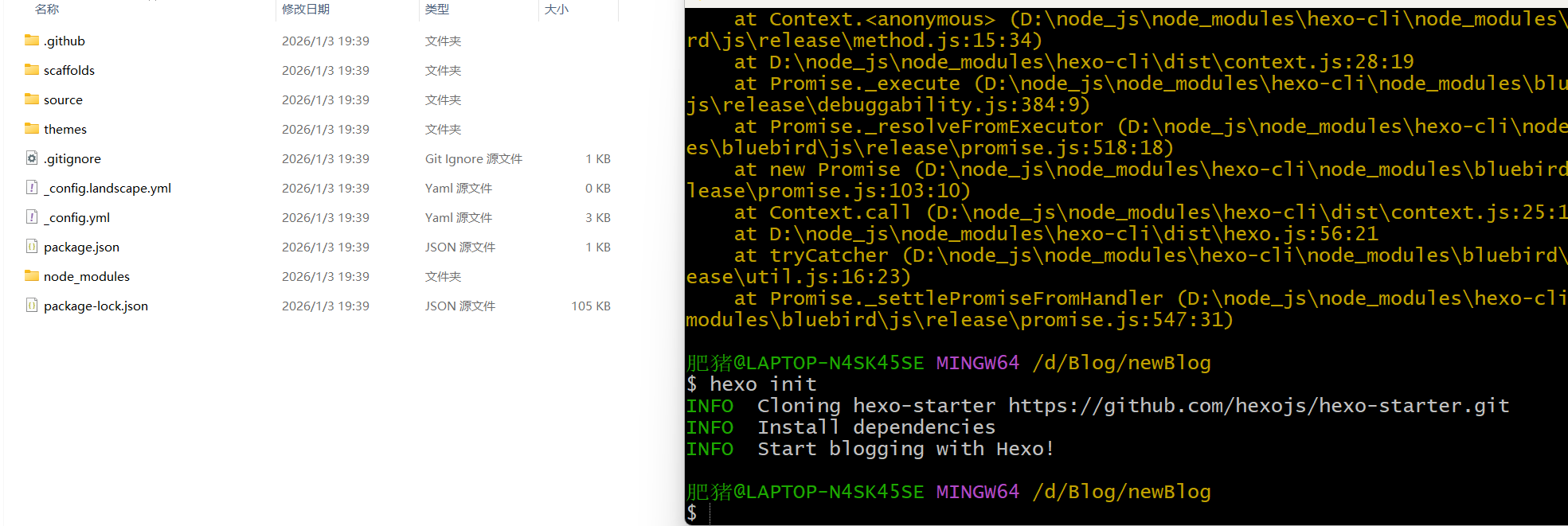
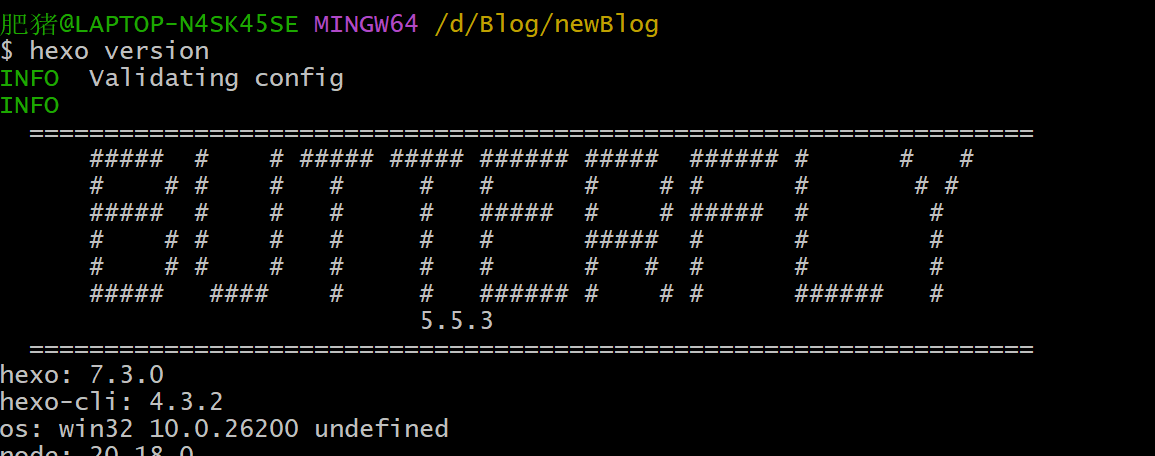
这是我已经写了几篇博客之后,重新对我的博客进行更新,然后把博客更新坏了,没办法只能重头再来了,为了避免重蹈覆辙,写一个笔记。
下载博客主题
博客主题就是类似于手机主题一样,可以帮你快速构建一个博客,我以前选的是hexo+butterfly,现在还是用hexo+butterfly
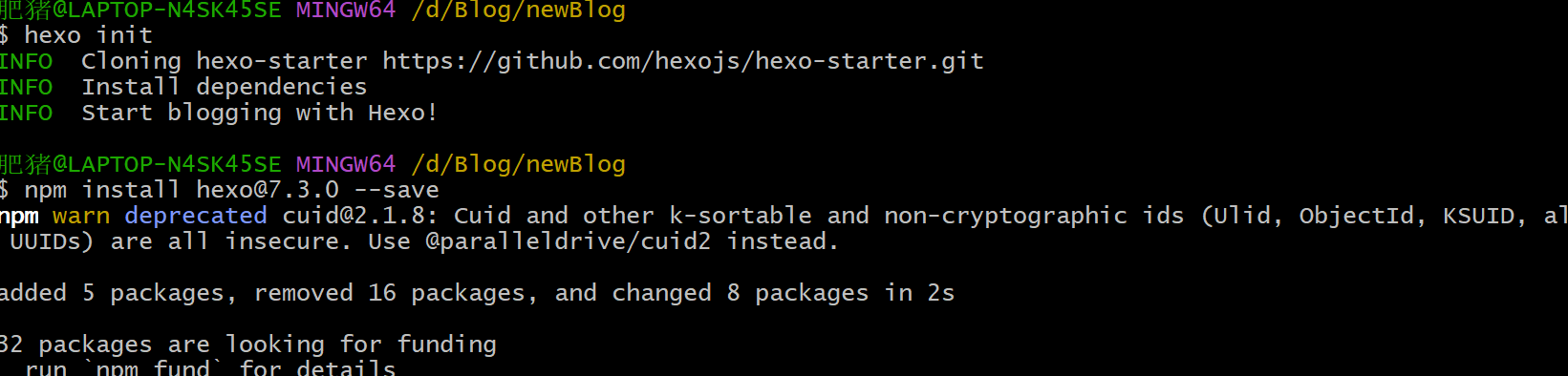
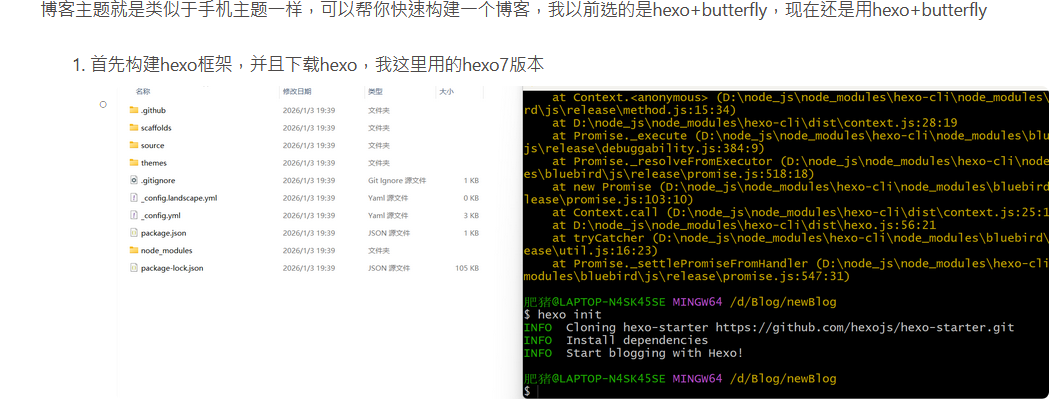
- 首先构建hexo框架,并且下载hexo,我这里用的hexo7版本
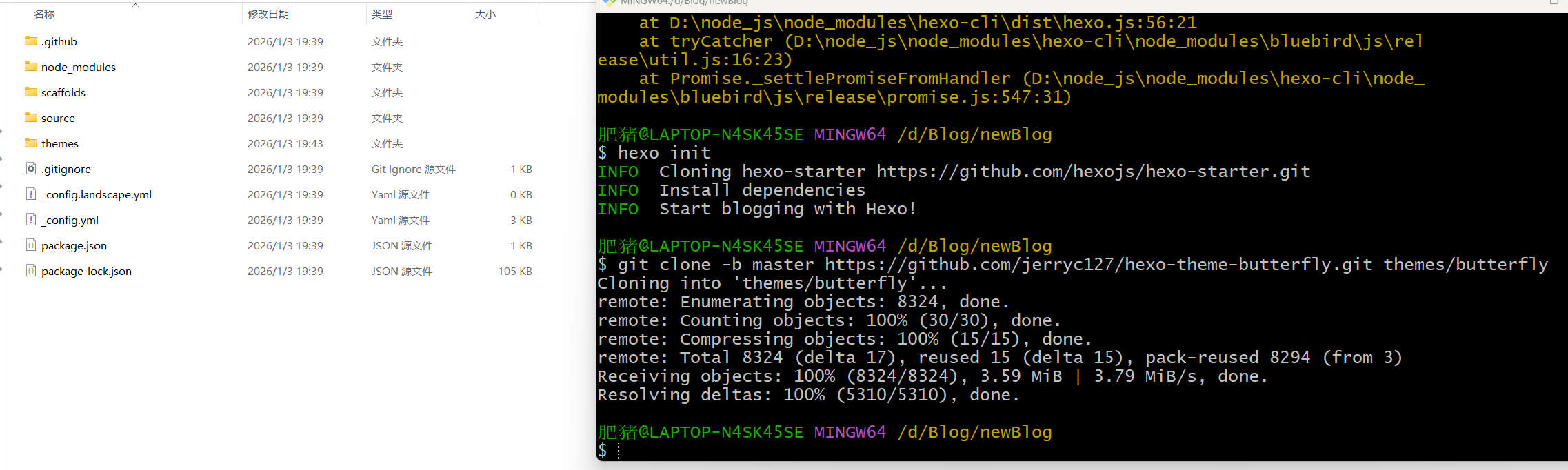
- 下载butterfly主题
- 下载模板渲染插件
npm install hexo-renderer-pug hexo-renderer-stylus --save
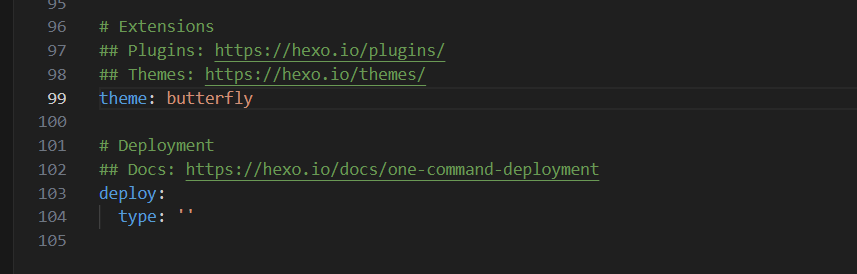
- 修改hexo的主题为butterfly(在hexo的配置文件_config.yml)
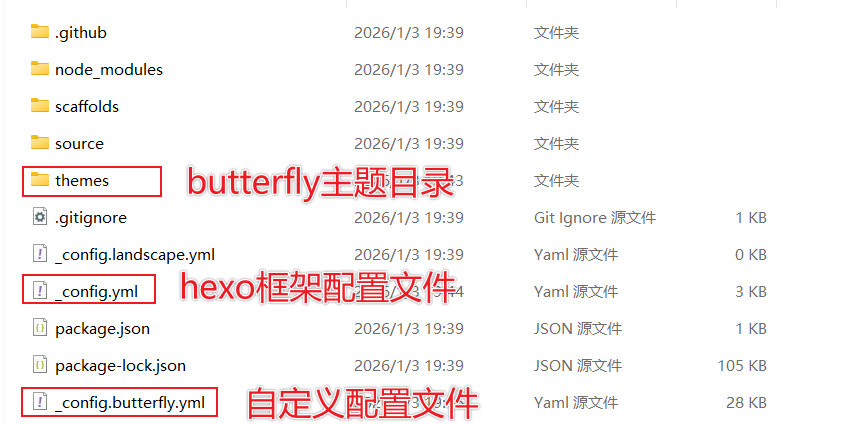
- 创建自定义配置文件命名为_config.butterfly.yml,放在hexo的根目录下(文件内容直接复制butterfly的默认配置文件)Hexo 会自动合併主题中的 _config.yml 和 _config.butterfly.yml 里的配置,如果存在同名配置,会使用 _config.butterfly.yml 的配置,其优先度较高。
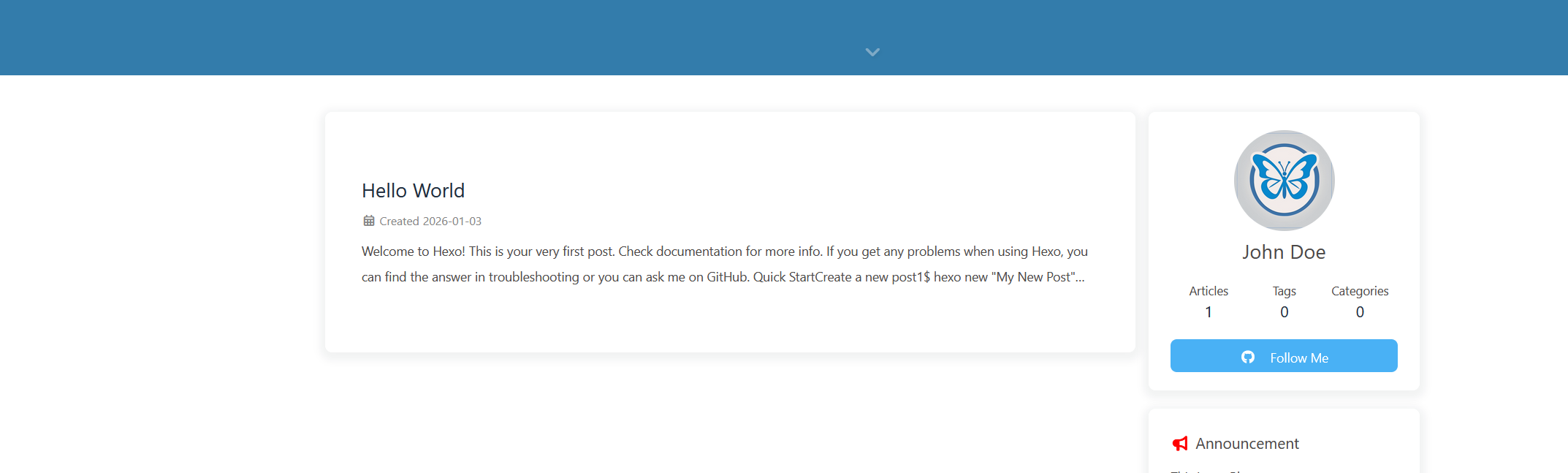
- 配置成功
编写博客文章
这里就直接把我之前写的一篇文章进行发布即可
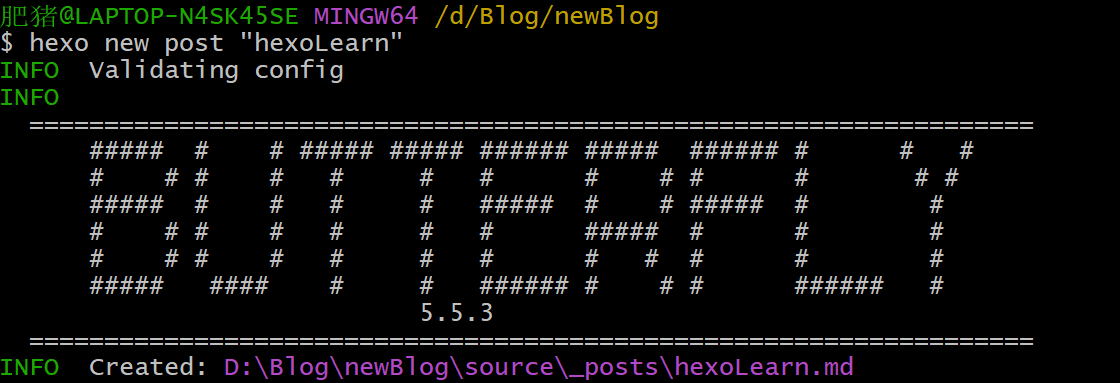
- 首先使用
hexo new post "文章名" - 然后将我编写的md复制到D:\Blog\newBlog\source_posts\hexoLearn.md中(注意是在—分割线之下,这个分割线以及里面的对象后面讲解)
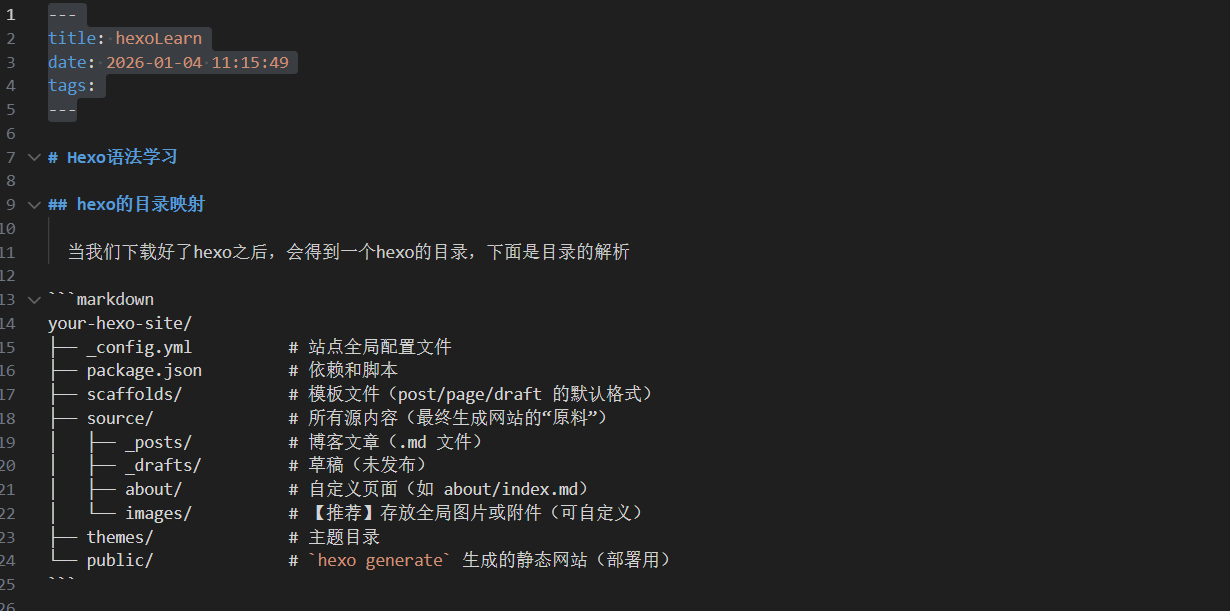
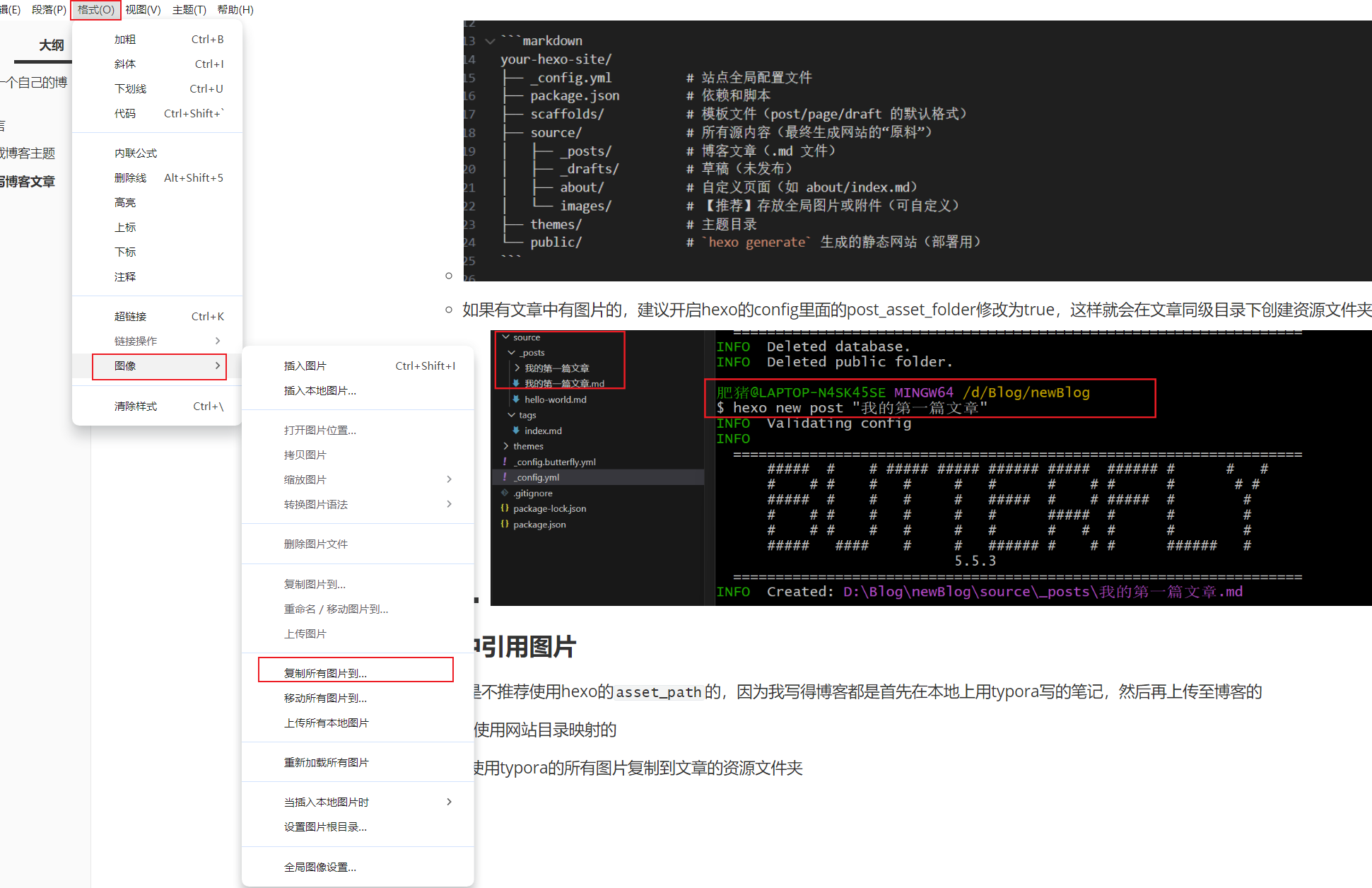
- 如果有文章中有图片的,建议开启hexo的config里面的post_asset_folder修改为true,这样就会在文章同级目录下创建资源文件夹
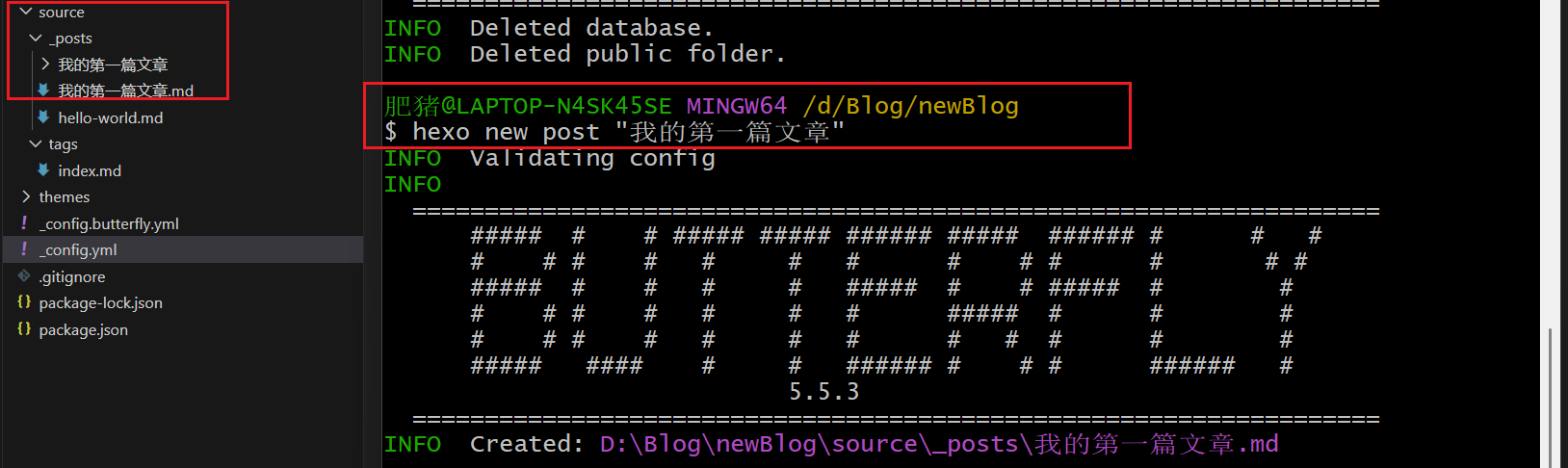
文章中引用图片
创建文章
我个人是不推荐使用hexo的asset_path的,因为我写得博客都是首先在本地上用typora写的笔记,然后再上传至博客的
我是直接使用网站目录映射的
- 首先使用typora的所有图片复制到文章的资源文件夹
- 然后将我的笔记复制到博客的文章中
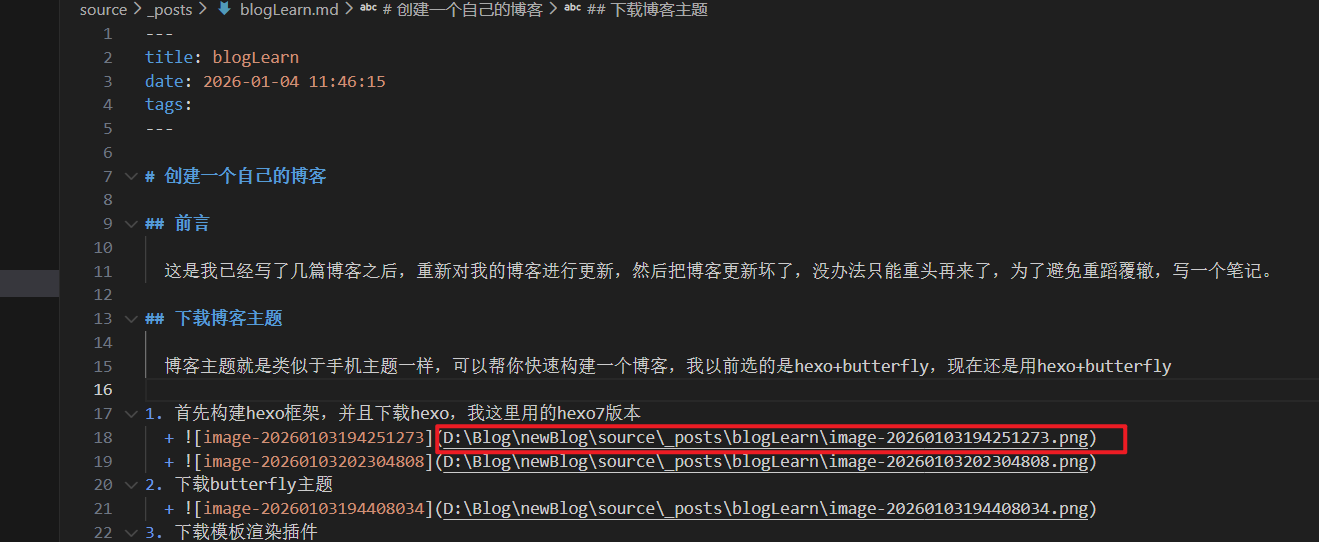
- 这里的图片是映射不出来的,因为他这里读取的是我本地图片路径,部署到网站时是无法读取的,我们可以直接部署尝试图片是什么路径

- 但是我们可以直接使用网站目录映射
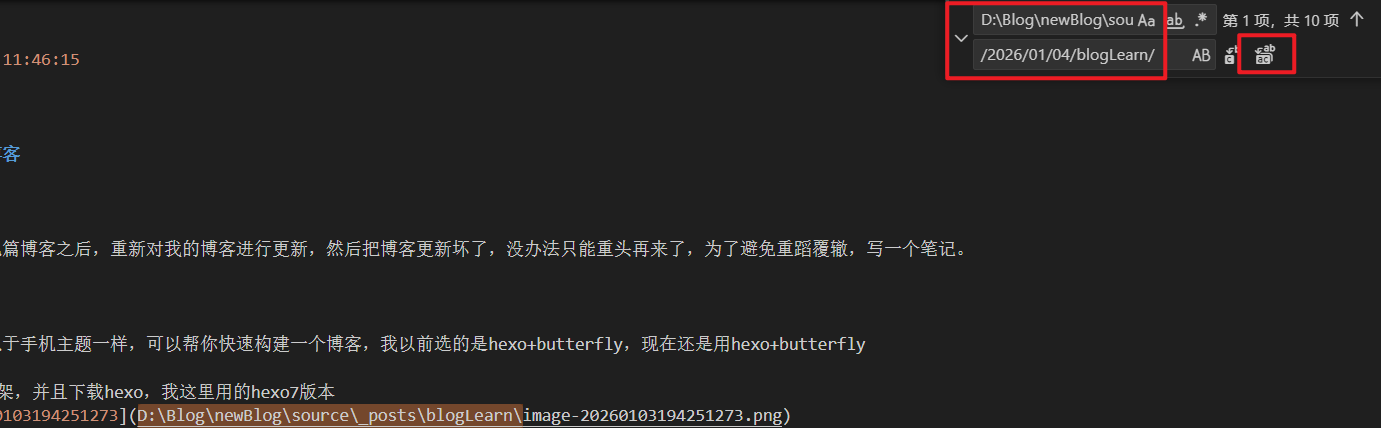
- vscode全局替换为网站映射目录
- 映射成功

编写分类界面
在编写博客时,我们可能需要分类页,例如:一个分类页包含了所有的分类标签,或者一个外链页包含了所有的外链
首先使用butterfly开启导航栏
- 把注释删除

- 效果展示,每一个就是一个界面,例如/music就是一个music分类界面

- 那直接根据效果改变即可
- 这是我的导航栏
1
2
3
4
5
6
menu:
上朝听政: / || fas fa-home
翰林书院: /tags/ || fas fa-book #标签
诸侯会盟: /link/ || fas fa-link #友链
皇家玉牒: /about/ || fas fa-compact-disc #关于
御赐黄签: /categories/ || fas fa-bookmark #分类- 效果图,图标是butterfly引用FontAwesome 的

- 再使用
hexo new page “对应的界面”即可
- 把注释删除
编写具体的分类页面:友链
覆盖这些配置文件前,记得先备份
- 修改[hexoroot]\themes\butterfly\layout\includes\page\flink.pug
1 | #article-container |
- 修改[hexoroot]\themes\butterfly\source\css_page\flink.styl
1 | .flink-desc |
- [hexoroot]source_data\link.yml没有这个路径就创建一个
1 | - class_name: 王侯藩国 |
- 效果预览

编写具体的归档界面
这些界面都是由butterfly函数自动计算产生,即你只要在你写的文章前加上这个分类,他就会自动计算
例如:
1 | --- |
这样butterfly就会自动产生tag标签和categories分类
参考:Butterfly归档、分类、标签美化 | June’s Blog
下面给的是butterfly的标签页面和分类界面、归档界面美化教程:
覆盖这些配置文件前,记得先备份,没有文件就创建
[hexoroot]\source\css\layout.css
1
2
3
4
5
6
7
8
9
10
11
12
13
14
15
16
17
18
19
20
21
22
23
24
25
26
27
28
29
30
31
32
33
34
35
36
37
38
39
40
41
42
43
44
45
46
47
48
49
50
51
52
53
54
55
56
57
58
59
60
61
62
63
64
65
66
67
68
69
70
71
72
73
74
75
76
77
78
79
80
81
82
83
84
85
86
87
88
89
90
91
92
93
94
95
96
97
98
99
100
101
102
103
104
105
106
107
108
109
110
111
112
113
114
115
116
117
118
119
120
121
122
123
124
125
126
127
128
129
130
131
132
133
134
135
136
137
138
139
140
141
142
143
144
145
146
147
148
149
150
151
152
153
154
155
156
157
158
159
160
161
162
163
164
165
166
167
168
169
170
171
172
173
174
175
176
177
178
179
180
181
182
183
184
185
186
187
188
189
190/* 归档页 */
.layout.hide-aside {
max-width: 1400px;
}
#archive,
#tag,
#category {
background: var(--june-card-bg);
padding: 25px 10px;
}
.article-sort-title {
margin-top: 30px;
margin-bottom: 20px;
}
.article-sort-item::before,
.article-sort-title::before,
.article-sort-title::after {
content: none;
}
.article-sort .year {
width: 100% ;
border-bottom: dashed 5px var(--june-theme);
font-size: 26px;
margin-top: 20px;
}
.article-sort {
border: none;
display: flex;
flex-wrap: wrap;
margin: 20px 20px;
padding: 0;
}
.article-sort-item:not(.year) {
padding: 8px 10px;
width: calc(50% - 0.8rem);
margin: 0.4rem;
border: 2px solid var(--june-theme);
border-radius: 15px;
background: var(--card-bg);
transition: 0.5s;
height: 120px;
}
.article-sort-item-a {
position: absolute;
width: 100%;
height: 100%;
}
.article-sort-item-img {
transition: 0.5s;
height: 90px;
width: 140px;
}
.article-sort-item>a>img {
border-radius: 15px;
}
.article-sort-item-title {
font-size: 22px;
padding-left: 10px;
margin: 10px 0;
line-height: 25px;
text-overflow: ellipsis;
}
.article-sort-item-title:hover {
transform: none;
}
.article-sort-meta {
height: max-content;
position: relative;
}
.article-sort-meta>.article-meta-wrap {
float: left;
}
.article-sort-meta>.article-sort-item-time {
float: right;
}
.article-sort-item-categories,
.article-sort-item-tags {
margin: 0 3px;
padding: 5px 8px;
border-radius: 25px;
border: 1px solid var(--dark-grey);
font-size: 12px;
transition: 0.5s;
}
.article-sort-item-info>div:not(.article-sort-meta) {
display: flex;
}
.article-sort-description,
.article-sort-item>i {
width: 0;
opacity: 0;
overflow: hidden;
transition: 0.5s;
}
.article-sort-description {
width: 0;
height: 59px;
vertical-align: middle;
margin: 5px 10px 0 15px;
text-overflow: ellipsis;
}
.article-sort-item:hover:not(.year) {
background-color: var(--june-theme);
box-shadow: 0 0 10px var(--june-theme);
}
.article-sort-item:hover:not(.year) {
background-color: var(--june-theme);
box-shadow: 0 0 10px var(--june-theme);
}
.article-sort-item:hover:not(.year) .article-sort-description,
.article-sort-item:hover:not(.year)>i {
width: auto;
opacity: 1;
}
.article-sort-item:hover:not(.year) .article-sort-description {
width: auto;
}
.article-sort-item:hover:not(.year) .article-sort-item-img {
transition: 0.5s;
width: 0;
}
.article-sort-item:hover:not(.year) .article-sort-item-title {
color: var(--june-white) ;
}
.article-sort-item:hover:not(.year) .article-meta-wrap a,
.article-sort-item:hover:not(.year) .article-sort-description,
.article-sort-item:hover:not(.year) .article-sort-item-time {
color: var(--june-light-grey) ;
}
.article-sort-item:hover:not(.year) .article-sort-item-categories {
border: 1.5px solid #212F3C;
}
.article-sort-item:hover:not(.year) .article-sort-item-tags {
border: 1.5px solid var(--june-blue);
}
.article-sort-item:hover:not(.year) .article-sort-item-categories:hover {
background: #212F3C;
box-shadow: 0 0 5px #212F3C;
}
.article-sort-item:hover:not(.year) .article-sort-item-tags:hover {
background: var(--june-blue);
box-shadow: 0 0 5px var(--june-blue);
}
@media screen and (max-width:768px) {
.article-sort-item:not(.year) {
width: 100%;
}
.article-sort-meta>.article-meta-wrap {
display: none;
}
.article-sort-item-title {
font-size: 16px;
}
.article-sort-item-img {
width: 90px;
}
}[hexoroot]\themes\butterfly\layout\includes\mixins\article-sort.pug
1
2
3
4
5
6
7
8
9
10
11
12
13
14
15
16
17
18
19
20
21
22
23
24
25
26
27
28
29
30
31
32
33
34
35
36
37
38mixin articleSort(posts)
.article-sort
- var year
- posts.each(function (article) {
- let tempYear = date(article.date, 'YYYY')
- let no_cover = article.cover === false || !theme.cover.archives_enable ? 'no-article-cover' : ''
- let title = article.title || _p('no_title')
if tempYear !== year
- year = tempYear
.article-sort-item.year= year
.article-sort-item(class=no_cover)
a.article-sort-item-a(href=url_for(article.path) title=title)
if article.cover && theme.cover.archives_enable
a.article-sort-item-img(href=url_for(article.path) title=title)
img(src=url_for(article.cover) alt=title onerror=`this.onerror=null;this.src='${url_for(theme.error_img.post_page)}'`)
.article-sort-item-info
div
a.article-sort-item-title(href=url_for(article.path) title=title)= title
.article-sort-description= article.description
.article-sort-meta
.article-meta-wrap
if (theme.post_meta.page.categories && article.categories.data.length > 0)
span.article-sort-item-categories
each item, index in article.categories.data
a(href=url_for(item.path)).article-meta__categories #[=item.name]
if (index < article.categories.data.length - 1)
i.fas.fa-angle-right
if (theme.post_meta.page.tags && article.tags.data.length > 0)
each item, index in article.tags.data
span.article-sort-item-tags
a(href=url_for(item.path)).article-meta__tags #[=item.name]
if (index < article.tags.data.length - 1)
span.article-meta__link
.article-sort-item-time
i.far.fa-calendar-alt
time.post-meta-date-created(datetime=date_xml(article.date) title=_p('post.created') + ' ' + full_date(article.date))= date(article.date, config.date_format)
i.fas.fa-chevron-right
- })hexo根目录下的butterfly.yml修改
1
2
3
4
5inject:
head:
- <link rel="stylesheet" href="/css/layout.css">
bottom:
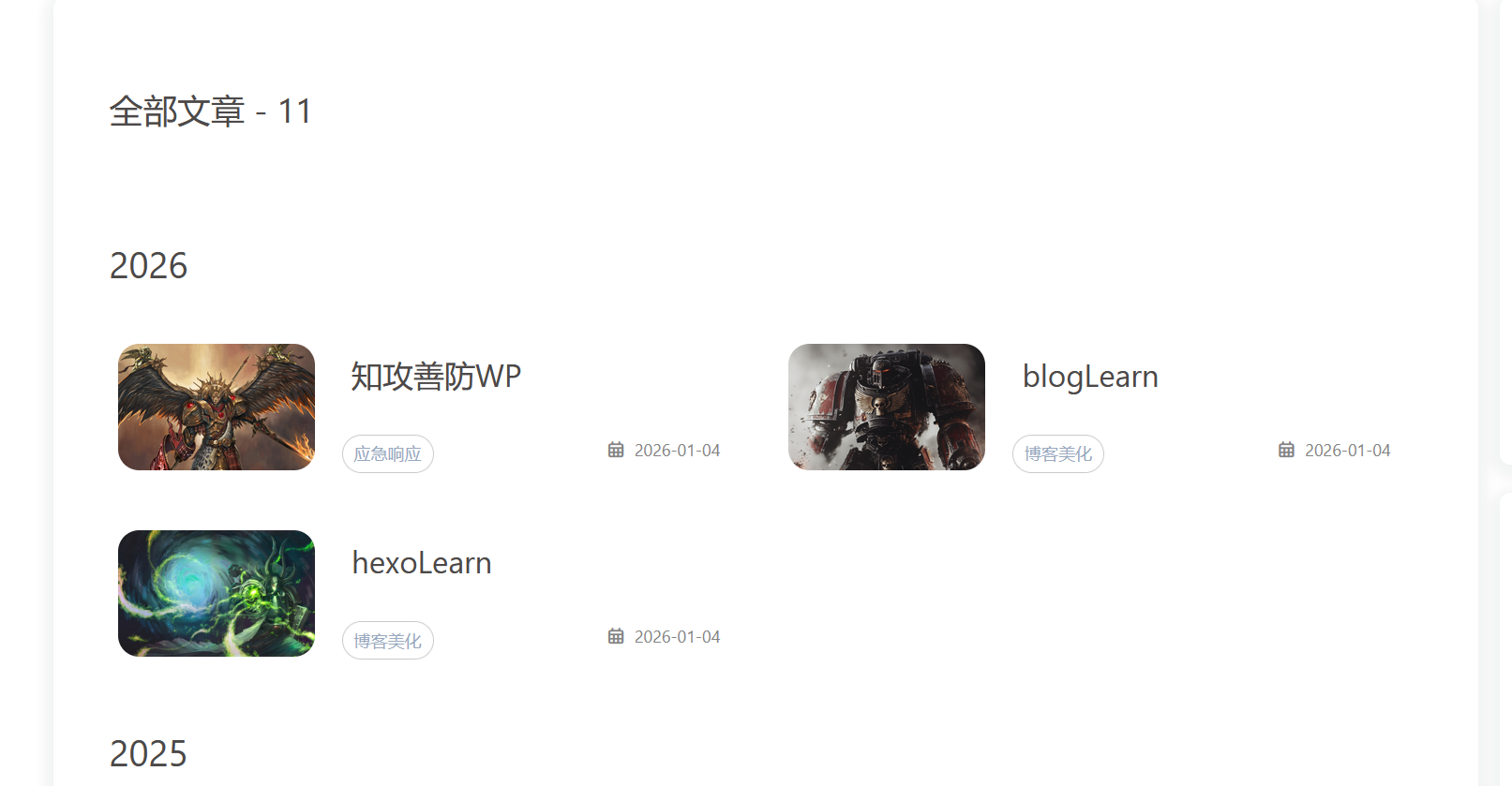
# - <script src="/js/script.js?1"></script>效果预览
修改图片
这些都只用进行图片引用,直接参照官方文档导入图片即可:
Butterfly 文檔(三) 主題配置 | Butterfly
页脚修改
参考文章:
覆盖这些配置文件前,记得先备份,没有文件就创建
主要效果:实现页脚运行时间、shieldsio图标、写书
- 修改[hexoroot]\themes\butterfly\layout\includes\footer.pug
1 | #footer-wrap |
- 修改[hexoroot]\source\css\footer.css文件
1 | /* 页脚 */ |
- 新建js文件[hexoroot]\source\js\foot.js
1 | // 确保 DOM 加载完成后再执行 |
- inject注入css、js文件

- 效果预览

首页轮播图添加
参考文章:
Butterfly轮播图Swiper | June’s Blog
覆盖这些配置文件前,记得先备份,没有文件就创建
首先安装hexo插件,如果之前安装了其他的swiper插件记得删除,否则会swiper冲突
1
npm install -s hexo-butterfly-swiper-lyx@1.0.1
修改[hexoroot]\themes\butterfly\layout\includes\header\nav.pug
1
2
3
4
5
6
7
8
9
10
11
12
13
14
15
16
17
18
19
20
21
22
23
24
25
26nav#nav
span#blog-info
a.nav-site-title(href=url_for('/'))
if theme.nav.logo
img.site-icon(src=url_for(theme.nav.logo) alt='Logo')
if theme.nav.display_title
span.site-name=config.title
if globalPageType === 'post' && theme.nav.display_post_title
a.nav-page-title(href=url_for('/'))
span.site-name=(page.title || config.title)
span.site-name
i.fa-solid.fa-circle-arrow-left
span= ' ' + _p('post.back_to_home')
#menus
if theme.search.use
#search-button
span.site-page.social-icon.search
i.fas.fa-search.fa-fw
span= ' ' + _p('search.title')
if theme.menu
!= partial('includes/header/menu_item', {}, {cache: true})
#toggle-menu
span.site-page
i.fas.fa-bars.fa-fwbutterfly的配置文件末尾添加,具体配置信息可以查看上面糖果屋的参考文章
1
2
3
4
5
6
7
8
9
10
11
12
13swiper:
enable: true # 开关
priority: 5 # 过滤器优先权
enable_page: / # 应用页面
layout: # 挂载容器类型
type: id
name: recent-posts
index: 0
default_descr: 懒得写描述,摆烂
swiper_css: https://cdnjs.cloudflare.com/ajax/libs/Swiper/5.4.5/css/swiper.min.css
swiper_js: https://cdnjs.cloudflare.com/ajax/libs/Swiper/5.4.5/js/swiper.min.js
custom_css: https://npm.elemecdn.com/hexo-butterfly-swiper-lyx/lib/swiperstyle.css
custom_js: https://npm.elemecdn.com/hexo-butterfly-swiper-lyx/lib/swiper_init.jscss文件添加[hexoroot]\source\css\swiper.css,修改了一个大屏适配
1
2
3
4
5
6
7
8
9
10
11
12
13
14
15
16
17
18
19
20
21
22
23
24
25
26
27
28
29
30
31
32
33
34
35
36
37
38
39
40
41
42
43
44
45
46
47
48
49
50
51
52
53
54
55
56
57
58
59
60
61
62
63
64
65
66
67.swiper-button-prev,
.swiper-button-next {
background-image: none ;
/* 去掉swiper.min.css中按钮的背景图片 */
}
.swiper-button-next:after,
.swiper-button-prev:after {
color: var(--june) ;
/* 箭头的颜色 */
}
@media screen and (min-width: 768px) {
#swiper_container {
height: 270px
}
.blog-slider__title {
font-size: 1.8rem;
text-align: center
}
.blog-slider__content>* {
margin: 5px ;
/* 设置子元素的外边距为 5px */
}
}
@media screen and (max-width: 768px) {
#swiper_container {
height: 12rem
}
.blog-slider__title {
font-size: 1.3rem;
text-align: center
}
.blog-slider__text {
display: none
}
}
/* =================================================
* 大屏:让轮播图像小屏一样,占一整行(两列)
* 只追加,不覆盖原有规则
* ================================================= */
@media screen and (min-width: 768px) {
/* 只命中“包含 swiper 的那张卡片” */
#recent-posts>.recent-post-item:has(#swiper_container) {
width: 100% ;
max-width: 100% ;
flex: 0 0 100% ;
/* 兼容 Butterfly masonry 定位 */
position: relative ;
transform: none ;
}
/* swiper 自身撑满 */
#recent-posts>.recent-post-item:has(#swiper_container) #swiper_container,
#recent-posts>.recent-post-item:has(#swiper_container) .blog-slider {
width: 100% ;
}
}butterfly配置文件注入
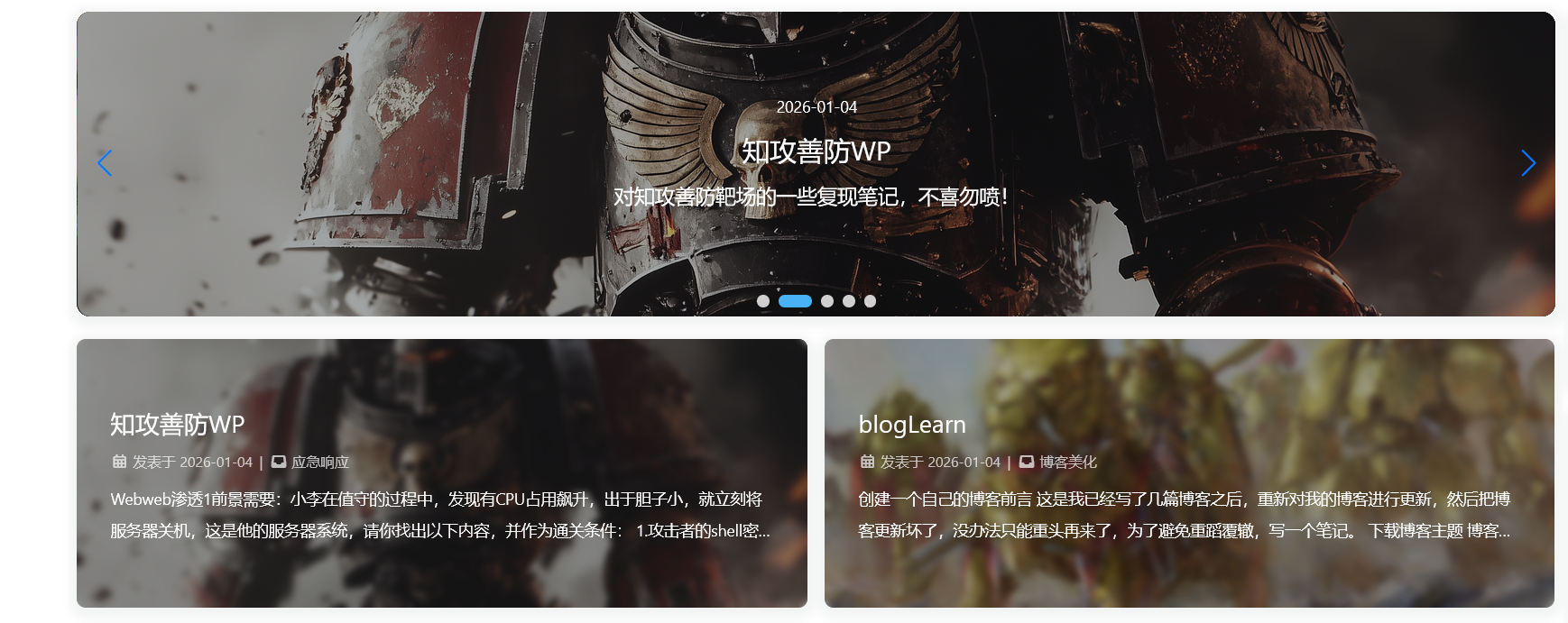
文章选入轮播图
效果预览


网站加载动画
参考文章:
覆盖这些配置文件前,记得先备份,没有文件就创建
[hexoroot]\themes\butterfly\layout\includes\custom\custom-loading.pug
1
2
3
4
5
6
7
8
9
10
11
12
13
14
15
16
17
18
19
20
21
22
23
24
25
26
27
28
29
30
31
32
33
34
35
36
37
38
39
40
41#loading-box
.loading-left-bg
.loading-right-bg
.spinner-box
.loading_img
script.
window.paceOptions = {
restartOnPushState: false
}
link(rel="stylesheet", href=url_for(theme.preloader.pace_css_url || theme.asset.pace_default_css))
script(src=url_for(theme.asset.pace_js))
script.
(()=>{
const $loadingBox = document.getElementById('loading-box')
const $body = document.body
const preloader = {
endLoading: () => {
$body.style.overflow = ''
$loadingBox.classList.add('loaded')
},
initLoading: () => {
$body.style.overflow = 'hidden'
$loadingBox.classList.remove('loaded')
}
}
preloader.initLoading()
//- pace进度条结束后再关闭loading
Pace.on('done', preloader.endLoading)
btf.addGlobalFn('pjaxSend', () => {
Pace.restart()
if (!{theme.pjax && theme.pjax.enable}){
preloader.initLoading()
}
}, 'pace_restart')
})()[hexoroot]\themes\butterfly\layout\includes\loading\index.pug
1
2
3
4
5
6
7
8
9
10if theme.preloader.enable
if theme.preloader.source === 1
include ./fullpage-loading.pug
//- 用于替换页面加载动画
else if theme.preloader.source === 3
include ../custom/custom-loading.pug
//- 用于替换页面加载动画
else
include ./pace.pug[hexoroot]\themes\butterfly\source\css_layout\loading.styl文章末尾添加
1
2
3
4
5
6
7
8
9
10
11
12
13
14
15
16
17
18
19
20
21
22
23
24
25
26
27
28
29
30
31
32
33
34
35
36
37
38
39
40
41
42
43
44
45// 添加自定义动画加载样式
else if hexo-config('preloader.enable') && hexo-config('preloader.source') == 3
.loading-bg
position: fixed
z-index: 1000
width: 50%
height: 100%
background-color: var(--preloader-bg)
#loading-box
.loading-left-bg
@extend .loading-bg
.loading-right-bg
@extend .loading-bg
right: 0
.spinner-box
position: fixed
z-index: 1001
display: flex
justify-content: center
align-items: center
width: 100%
height: 100vh
.loading_img
width: 240px
height: 240px
position: relative
top: -130px
background: url(hexo-config('preloader.preloader_img')) 100% 100% no-repeat
&.loaded
.loading-left-bg
transition: all .5s
transform: translate(-100%, 0)
.loading-right-bg
transition: all .5s
transform: translate(100%, 0)
.spinner-box
display: none背景颜色自定义
[hexoroot]\themes\butterfly\source\css\var.styl第103行修改
1
2
3
4
5// preloader
// $preloader-bg = #37474f
// 将preload背景色换为由yml配置
$preloader-bg = hexo-config('preloader.preloader-bg') ? convert(hexo-config('preloader.preloader-bg')) : #37474f
$preloader-word-color = #fff
进度条还是去butterfly支持的PACE — Automatic page load progress bars下载一个,我这里选择的是LoadingBar(还有选择color),当然你也可以选择其他的,然后下载将其css导入即可
- [hexoroot]\source\css\loading-bar.css,导入到这个路径
最后在butterfly的配置文件中的preloader选项,添加选项3即可
1
2
3
4
5
6
7
8
9
10
11
12
13
14
15# Loading Animation
preloader:
enable: true
# source
# 1. fullpage-loading
# 2. pace (progress bar)
# 3. 自定义加载动画
source: 3
# 自定义的加载动画中间图片
preloader_img: /assets/images/你的动画加载图片.gif
# 自定义的加载动画背景色
preloader-bg: "rgba(240,230,240, 1)"
# pace theme (see https://codebyzach.github.io/pace/)
pace_css_url: /assets/css/loading-bar.css效果预览


分类界面优化
参考文章:
覆盖这些配置文件前,记得先备份,没有文件就创建
这个操作是将友链界面的侧边栏取消掉
[hexoroot]\newBlog_config.butterfly.yml
1
2
3
4
5
6
7
8
9
10
11
12
13aside:
enable: true
hide: false
# Show the button to hide the aside in bottom right button
button: true
mobile: true
# Position: left / right
position: right
display:
archive: false
tag: false
category: false
flink: false # 友链页隐藏侧栏修改[hexoroot]\themes\butterfly\layout\includes\layout.pug,仅顶部添加一行(友链页隐藏侧栏),不是完全覆盖
1
2
3
4
5
6
7- var globalPageType = getPageType(page, is_home)
- var htmlClassHideAside = theme.aside.enable && theme.aside.hide ? 'hide-aside' : ''
- page.aside = globalPageType === 'archive' ? theme.aside.display.archive: globalPageType === 'category' ? theme.aside.display.category : globalPageType === 'tag' ? theme.aside.display.tag : page.aside
- page.aside = page.type === 'link' ? theme.aside.display.flink : page.aside // - 友链页隐藏侧栏
- var hideAside = !theme.aside.enable || page.aside === false ? 'hide-aside' : ''
- var pageType = globalPageType === 'post' ? 'post' : 'page'
- pageType = page.type ? pageType + ' type-' + page.type : pageType
取消分类、标签界面的顶部图片,在front-matter处添加top_img: false即可
将分类、归档界面的page居中显示
- [hexoroot]\themes\butterfly\source\css_page\common.styl
1 | #body-wrap |
标签加入计数上标修改D:\Blog\newBlog\themes\butterfly\scripts\helpers\page.js的大概48行左右
1 | return source.sort(orderby, order).map(tag => { |
站点搜索引擎收录
参考文章:
Butterfly 进阶篇(一) - SEO 优化搜索引擎收录 | 悠悠の哉
Hexo全自动搜索引擎推送指南 - 百度/谷歌/必应收录加速方案 | 炸薯条🍟の求知笔记
首先实现永久化网址,因为hexo默认的网址路由太长了,不利于搜索爬虫的搜录
安装
abbrlink插件:
1
npm install hexo-abbrlink --save
- hexo的config.yaml文件修改
1
2
3
4
5
6
7
8
9
10
11
12
13
# URL
## Set your site url here. For example, if you use GitHub Page, set url as 'https://username.github.io/project'
url: http://example.com
permalink: posts/:abbrlink.html
permalink_defaults:
pretty_urls:
trailing_index: true # Set to false to remove trailing 'index.html' from permalinks
trailing_html: true # Set to false to remove trailing '.html' from permalinks
# abbrlink config
abbrlink:
alg: crc32 # support crc16(default) and crc32
rep: hex # support dec(default) and hex
效果预览
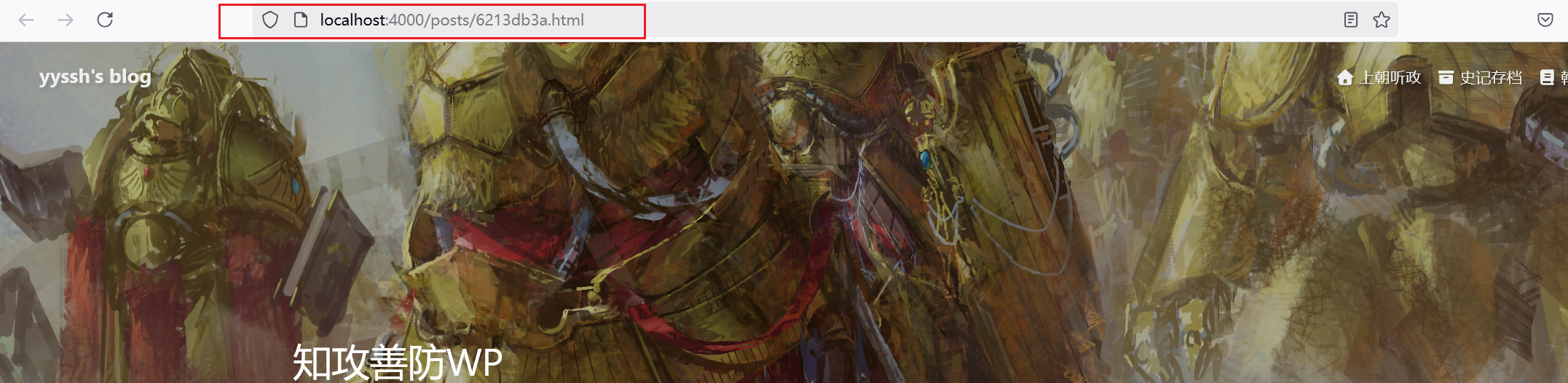
由于我之前的图片都是放在同级同名目录下的,所以这个图片目录也要修改
安装插件
1 | npm install --save hexo-submit-urls-to-search-engine |
- 修改hexo的配置文件,末尾添加下面代码即可
1 | hexo_submit_urls_to_search_engine: |
- 修改hexo的deploy配置项
1 | deploy: |
TODO CDN加速
参考文章:
Butterfly CDN链接更改指南,替换jsdelivr提升访问速度 | 张洪Heo
总结来说就是将butterfly的外网cdn换成国内的cdn,从而提高访问速度
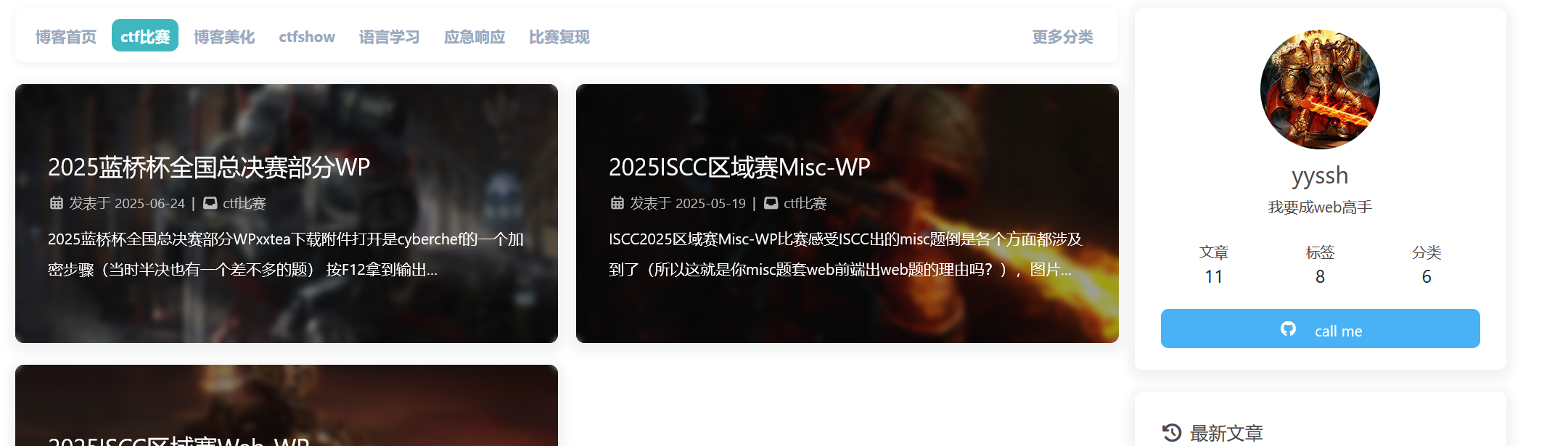
添加分类条
参考文章:
魔改笔记七:分类条及外链卡片 | LiuShen’s Blog
覆盖这些配置文件前,记得先备份,没有文件就创建
因为我的轮播图的样式和首页样式都自己修改过,可能跟参考文章有些许出入,当然你能用哪个就用哪个
[hexoroot]themes\butterfly\layout\includes\categoryBar.pug
1
2
3
4
5
6
7
8
9.category-bar-items#category-bar-items(class=is_home() ? 'home' : '')
.category-bar-item(class=is_home() ? 'select' : '', id="category-bar-home")
a(href=url_for('/'))= __('博客首页')
each item in site.categories.find({ parent: { $exists: false } }).data
.category-bar-item(class=select ? (select === item.name ? 'select' : '') : '', id=item.name)
a(href=url_for(item.path))= item.name
div.category-bar-right
a.category-bar-more(href=url_for('/categories/'))= __('更多分类')[hexoroot]\themes\butterfly\source\css_layout\category-bar.styl
1
2
3
4
5
6
7
8
9
10
11
12
13
14
15
16
17
18
19
20
21
22
23
24
25
26
27
28
29
30
31
32
33
34
35
36
37
38
39
40
41
42
43
44
45
46
47
48
49
50
51
52
53
54
55
56
57
58
59
60
61
62
63
64
65
66
67#category-bar
padding 7px 11px
background var(--card-bg)
border-radius 8px
display flex
white-space nowrap
overflow hidden // ★ 防止自身溢出
transition 0.3s
height 50px
width 100%
max-width 100% // ★ 双保险
box-sizing border-box // ★ padding 不再撑宽
justify-content space-between
user-select none
align-items center
margin-bottom 20px
// 突出边框
border 1px solid var(--card-border)
box-shadow 0 2px 6px rgba(0, 0, 0, .06)
.category-bar-right
flex-shrink 0 // ★ 固定“更多分类”宽度
display flex
border-radius 8px
align-items center
.category-bar-more
margin-left 4px
margin-right 4px
font-weight 700
border-radius 8px
padding 0 8px
.category-bar-items
flex 1 1 auto // ★ 允许伸缩
min-width 0 // ★★ 核心修复点
white-space nowrap
overflow-x auto
overflow-y hidden
scrollbar-width none
-ms-overflow-style none
display flex
border-radius 8px
align-items center
height 30px
&::-webkit-scrollbar
display none
.category-bar-item
flex-shrink 0 // ★ 单个分类不被压扁
a
padding .1rem .5rem
margin-right 6px
font-weight 700
border-radius 8px
display flex
align-items center
height 30px
&.select
a
background #3eb8be
color var(--btn-color)将修改添加至首页[hexoroot]\themes\butterfly\layout\includes\mixins\indexPostUI.pug,部分修改为如下,category-bar是我们主要添加的部分
1
2
3
4
5
6
7
8
9
10
11
12
13
14
15
16
17
18
19
20
21
22mixin indexPostUI()
- const indexLayout = theme.index_layout
- const masonryLayoutClass = (indexLayout === 6 || indexLayout === 7) ? 'masonry' : ''
#recent-posts.recent-posts.nc(class=masonryLayoutClass)
#category-bar
include ../categoryBar.pug
.recent-post-items
each article, index in page.posts.data
.recent-post-item
- const link = article.link || article.path
- const title = article.title || _p('no_title')
- const leftOrRight = indexLayout === 3 ? (index % 2 === 0 ? 'left' : 'right') : (indexLayout === 2 ? 'right' : '')
- const post_cover = article.cover
- const no_cover = article.cover === false || !theme.cover.index_enable ? 'no-cover' : ''
if post_cover && theme.cover.index_enable
.post_cover(class=leftOrRight)
a(href=url_for(link) title=title)
if article.cover_type === 'img'
img.post-bg(src=url_for(post_cover) onerror=`this.onerror=null;this.src='${url_for(theme.error_img.post_page)}'` alt=title)
else
div.post-bg(style=`background: ${post_cover}`)这样就已经做好了轮播图和文章之间添加分类条
后面看个人的喜好,我个人是偏向于分类界面和index保持一致
修改butterfly.config.yaml,大概在791行左右
1
2category_ui: index # 将分类子界面与index保持一致
tag_ui:添加分类界面的js逻辑,实现分类条当前选择条目高亮
[hexoroot]\themes\butterfly\source\js\main.js,主要添加一个js逻辑
大约在791行添加js逻辑函数
1
2
3
4
5
6
7
8
9
10
11
12
13
14
15
16
17
18
19
20/**
* 分类条当前选择条目高亮
*/
const setCategoryBarActive = () => {
const categoryBar = document.querySelector("#category-bar");
const currentPath = decodeURIComponent(window.location.pathname);
const isHomePage = currentPath === GLOBAL_CONFIG.root;
if (categoryBar) {
const categoryItems = categoryBar.querySelectorAll(".category-bar-item");
categoryItems.forEach(item => item.classList.remove("select"));
const activeItemId = isHomePage ? "category-bar-home" : currentPath.split("/").slice(-2, -1)[0];
const activeItem = document.getElementById(activeItemId);
if (activeItem) {
activeItem.classList.add("select");
}
}
};大约在968行,选择调用添加的js逻辑函数
1
2
3
4
5
6
7
8
9
10
11
12
13
14const refreshFn = () => {
initAdjust()
justifiedIndexPostUI()
if (GLOBAL_CONFIG_SITE.pageType === 'post') {
addPostOutdateNotice()
GLOBAL_CONFIG.relativeDate.post && relativeDate(document.querySelectorAll('#post-meta time'))
} else {
GLOBAL_CONFIG.relativeDate.homepage && relativeDate(document.querySelectorAll('#recent-posts time'))
GLOBAL_CONFIG.runtime && addRuntime()
addLastPushDate()
toggleCardCategory()
setCategoryBarActive() //分类条当前选择条目高亮
}
效果预览